
Admissions and Aid
Welcome to Central Washington University
We look forward to helping you through the process of becoming a Wildcat. We understand that navigating the next steps after submitting your application can be both thrilling and a tad overwhelming. Rest assured, we're here to guide you through each milestone with personalized support.
Next Steps
-
Accept Your Admission
Once you are admitted, confirm your enrollment by accepting your admission in your Applicant Portal.
- Log into your CWU Applicant Portal using the same email and password you used to apply for admission.
- If you have already created your MyCWU portal, simply log in to your MyCWU portal and use the Accept/Decline button in your Admissions Toolbox to make your decision official.
- Refresh your CWU Applicant Portal and "Accept your Admission".
Confirming your admission lets CWU know you intend to enroll in classes. We recommend confirming your enrollment early, however, the priority deadline to confirm is May 1st for the Fall term. Confirming your admission also allows you to apply for housing, register for an Orientation session and secure scholarships for 2025-2026 academic year.
Haven't applied? Become a Wildcat today!
Apply to CWU -
Create a MyCWU Account and Access Email
MyCWU
MyCWU is your main portal for all things CWU, from registering for classes, checking financial aid, housing, support and more.
- Please update your CWU account by visiting CWU Account Management. Have your CWU username and ID number handy.
- A username was assigned to you after you submitted your application for admission. Your username is usually formatted as part of your last name and first initial(s).
- For example, Wellington Wildcat’s username would be WildcatWel
- Wildcat Tip: look for an email called "Information regarding your MyCWU account" sent from [email protected], this will have your CWU username and ID number listed along with other helpful information.
- A username was assigned to you after you submitted your application for admission. Your username is usually formatted as part of your last name and first initial(s).
- This username and password are different from the one you created to apply for admission.
- Be sure to keep your username and password handy.
- Wildcat Tip: CWU requires a password change every six months, watch for email notifications and instructions on changing your password so you don't get locked out!
CWU Multi-Factor Authentication (MFA)
- Every CWU student is required to have MFA to access their CWU account.
- The recommended authentication method is the Microsoft Authenticator application Please download the Microsoft Authenticator app through your mobile devices app store
- An alternative authentication method is receiving a call on your personal phone. If you would like to authenticate via a call to your phone, simply click on “I want to setup a different method” when prompted to download the Microsoft Authenticator app
- Wildcat Tip: If you get a new phone you will have to re-register your new device to log in to your CWU account.
Access your CWU Outlook Email Account
- Once you have access to the MyCWU portal, you can access your CWU Outlook email by clicking the CWU Outlook link inside the Applications block on the top right side of your CWU Home page.
- Wildcat Tip: It is a good idea to install the CWU Outlook email account, to your smart phone and check your email regularly for updates.
- You can also access your Outlook email from any browser by typing in Microsoft365.com and inputting your CWU username and password.
- Your CWU Outlook email account is your primary point of contact for financial aid, advising, and other areas of campus. You will need to check this regularly for important communications.
- Wildcat Tip: Your CWU outlook email account will only be accessible to you while you are a CWU student (once you graduate, you will lose access to the email account).
For technical assistance for your MyCWU, MFA or if you have not received an email with your CWU username, ID number and temporary password, please contact the CWU Service Desk at 509-963-2001.
More Resources
- Check out the Service Desk’s YouTube Video Playlist, click here!
- Please update your CWU account by visiting CWU Account Management. Have your CWU username and ID number handy.
-
Apply for Financial Aid
Submit your FAFSA/WASFA
Students should plan to submit either a FAFSA or WASFA. We recommend you begin your process with the WASFA Questionnaire. A person may not be eligible or may choose not to apply for federal aid due to immigration status, federal loan default, or repayments owed to federal grants.
If you are eligible for federal aid, you will be directed to submit your FAFSA through the US Department of Education website.
The FAFSA becomes available in December 2024 for the 2025-2026 academic year. There is no submission deadline for WASFA/FAFSA.
Apply for Scholarships
CWU Merit Awards are based on academic merit. All new students who apply for admission by April 1 (for fall start) will automatically be considered for merit awards, with no separate application required. Transfer students who apply for admission by August 1 (for fall start) will automatically be considered for merit awards, with no separate application required. Additional scholarship opportunities for students beginning in the fall are available on CWU Scholarships.
Accept your Financial Aid Package
Once you are offered a financial aid package, you will view and accept this offer through your MyCWU account. Once logged in, select "Financial Toolbox," then, "Accept/Decline Awards."
Complete Entrance Counseling/Promissory Note
If you accept loans, you must complete these federal requirements before your money will be released to CWU. Visit Financial Aid and Scholarships for more information.
-
Apply for On-Campus Housing
All first-year students are required to live on campus. The housing application becomes available on February 4th for the 2025-2026 academic year, and room selection is first come, first serve.
Find out about our residence Halls before you apply for housing. Be sure to complete your CWU Housing Application early so you can room in the hall of your choice.
You will also select a meal plan in your housing application. Learn more about our Dining Locations and Meal Plans before you apply.
For Fall quarter 2025, you must select your housing before August 2025, otherwise a room and board contract will automatically be assigned to you. You will not be able to begin a housing application until you accept your admission.
Find out more about the Housing Application Process, and apply for your housing through your MyCWU account.
Interested in learning about our Living Learning Communities (LLC)? Check out our website for more information. Living-Learning Communities
Transfer students are not required to live on campus but might enjoy CWU’s on-campus apartments, residence halls that are sophomore and above only, and our Transfer Living/Learning Community in Stephens-Whitney Hall. See the Housing website for more information.
-
Complete Your Pre-Advising Questionnaire
Complete your Pre-Advising Questionnaire
- Incoming students should complete the Pre-Advising Questionnaire (link below) to provide additional information to their academic advisor.
- Pre-Advising Questionnaire for Winter 2025 students: Link here!
- Pre-Advising Questionnaire will be available February 4, 2025 for Fall 2025 students.
- Pre-Advising Questionnaire for Winter 2025 students: Link here!
-
Follow this link if you need help scheduling an appointment: Link to Schedule an Appointment
-
Check this page for frequently asked questions about the Inspire platform for Advising and Learning Commons services.
- Academic Advisors will send important information about advising and class registration to your CWU Outlook email account. Check your CWU Outlook email often after accepting your admission to CWU.
- You will receive additional information from your advisor regarding necessary course placement requirements.
- Academic Writing Directed Self-Placement: Students who have not completed ENG 101 will receive information about completing the Directed Self- Placement assessment for Academic Writing. Click here to see more information about this assessment.
- Math/Quantitative Reasoning Placement: Students who have not completed the general education quantitative reasoning requirement or who need to qualify for a higher-level math course may need to complete a placement assessment. You will receive information from advising about requirements for Math or Quantitative Reasoning placement based on your planned major and/or previous coursework.
- Students may qualify for an exception if they:
- Have credit for a college-level math course
- Have taken Pre-Calculus or Calculus in High School and earned a C- average or higher
- Have taken the ALEKS Math Placement Exam or the Accuplacer for Math
- Students may qualify for an exception if they:
- Disability Services provides individuals with disabilities an equal opportunity to fully participate in and benefit from all aspects of the education environment. If you require an accommodation, visit the Disability Services to register.
- Incoming students should complete the Pre-Advising Questionnaire (link below) to provide additional information to their academic advisor.
-
Register to Attend Orientation
New Student Orientation
*REQUIRED FOR ALL ELLENSBURG FIRST-YEAR STUDENTS
New Student Orientation is your first step in the onboarding and orientation process as a Wildcat. During your New Student Orientation session you will:
- Connect with departments such as Financial Aid, Academic Advising, Housing & Residence Life, and Dining Services
- Learn about Move In and Week of Welcome in September 2025
- Meet CWU faculty, staff, and other students
New Student Orientation registration will open on February 4, 2025. Incoming first-year students will receive communication about how and where to register for an New Student Orientation session. The event dates, times, and activity schedule will be released soon.
Have questions about New Student Orientation? Don’t hesitate to contact the Orientation team at [email protected].
New Student Orientation dates for 2025:
- To Be Announced in November 2024
Transfer Student Orientation
*REQUIRED FOR ALL ELLENSBURG TRANSFER STUDENTS
Transfer Student Orientation is your orientation experience as a Wildcat. During Transfer Student Orientation session you will:
- Connect with departments such as Health and Wellness, Career Services, Learning Commons and Financial Aid.
- Learn about specific Transfer student resources
- Meet CWU faculty, staff, and other students
Incoming transfer students are REQUIRED to attend an Transfer Student Orientation session.
Transfer Student Orientation registration will open soon. The event dates, times, and activity schedule will be released soon. Date: To be announced in November 2024.
Week of Welcome
*REQUIRED FOR ALL ELLENSBURG FIRST-YEAR STUDENTSWeek of Welcome is the second REQUIRED orientation experience designed to help you build connections at CWU. You will have the opportunity to connect with other students, become familiar with CWU, gain wellness strategies, and learn about CWU procedures, expectations, and how to contribute to the community. We want to help prepare you for a successful academic experience. In addition to many fun activities, there will be several required educational sessions, workshops, and connections. No registration is required since it's mandatory experience.
Week of Welcome 2025 Friday September 19th - Tuesday September 23rd.
Are you at one of our University Sites and Centers?
Orientation is strongly encouraged for center students. This is also a great time to meet other students as well as staff and faculty.
At Orientation you can:
- Learn about student services and resources
- Meet with faculty, staff and other students
- Have questions answered by academic and student services representatives
To register for Orientation or for more information, visit your University Site or Center or call them directly. A Virtual Orientation is offered quarterly specifically for our Site, Center and online students. Check your CWU email often for registration details.
Learn more about Orientation -
Prepare for Your First Day
Purchase your Course Materials
- You may purchase the required course materials from the Wildcat Shop or from a third party. You will receive information about required and additional course materials through your Canvas portal and from the faculty members teaching your courses.
- Campus bookstores sell CWU sweatshirts, t-shirts and various school supplies.
- Students who want to use their financial aid to purchase course materials MUST purchase through the Wildcat Shop
Get your Connection Card (for students attending a CWU Campus)
- Your CWU Connection Card is your student ID. This card will allow you to check out materials from your host community college library, the Ellensburg campus library, and use the computer lab. Visit your university center campus to receive a CWU Connection Card.
- On the Ellensburg campus, your card is also used for Dining Dollars and Wildcat Bucks, to swipe into certain buildings and rooms on campus, and to obtain discounts to some local businesses.
- To receive your Connection Card, upload your photo and pick up your card when you come to campus. To upload your photo, either download the GET Mobile app or visit GET and log in with CWU credentials. Once in the app, click on "Quick Links" to upload your photo.
Required Voices for Change education on Canvas
- Required "Get Inclusive: Voices for Change" modules on Sexual Violence and Hazing Prevention, as well as Diversity, Equity, and Inclusion will be available in Canvas in August 2024 and are due mid-September. Login to your MyCWU, click on the Canvas link under Applications (upper right corner).
Purchase your Parking Permit (if Applicable)
- Parking permits are available at the Parking Office in the Public Safety Building or at the Cashier's Office in Barge Hall. You can purchase your permit with a check or debit/credit card, however cash payments are only accepted at the Cashier's Office.
- You can also complete a Parking Application Online
You belong at CWU
CWU orientation is vital for you as a student to familiarize yourself with resources and gain a sense of belonging in your academic journey. Receive clarity on academics and activities to boost your confidence for university life through orientation.
Learn more about OrientationAdditional Resources
Are you transferring in or an international student? We have additional resources for you!
Transfer Students
International Students
CWU News

CWU to host nationally recognized conservationist tonight at The Ridge
May 11, 2026 by Marketing and Communications
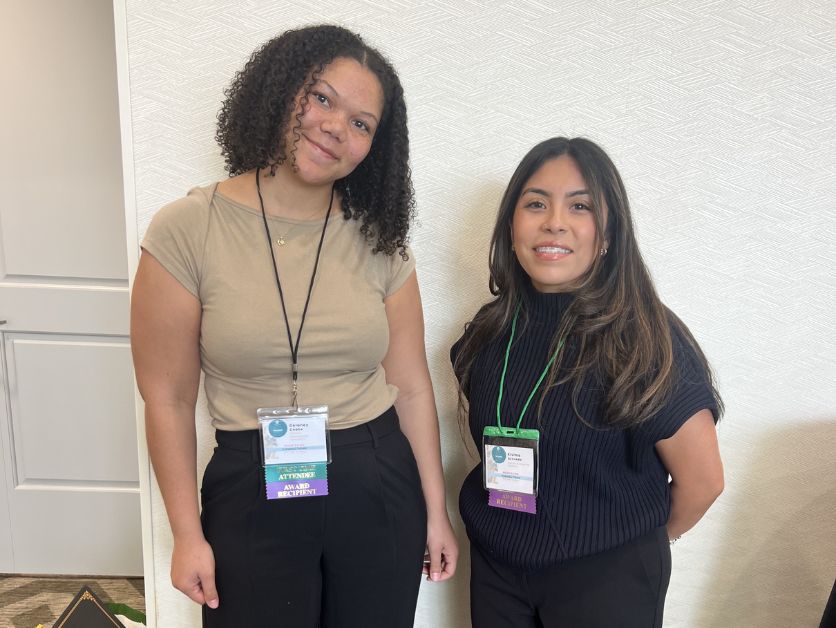
Two CWU Nutrition students earn awards from leading national organization
May 11, 2026 by Rune Torgersen
Questions? Contact Us.
Office of Admissions
Bouillon Hall 202
- [email protected]
- 509-963-1211
- Fax: 509-963-3065